
Use standards-aligned, in-platform inspection report templates that auto-populate from field capture. This is the fastest route to an audit-ready report in oil and gas, petrochemical, and utility work.
- API alignment: templates built around API 570 and API 510 clauses keep findings traceable to specific code sections.
- Audit-ready output: exports carry a tamper-evident trail, so reviewers can see who changed what and when.
If you're evaluating options now, the fastest test is a pilot on one asset class with a standards-aligned template, not a blank spreadsheet.
Key Takeaways
Audit-ready reporting depends on in-platform templates that auto-populate from field capture and cite specific API clauses, not on static downloadable forms.
| Point | Details |
|---|---|
| Choose in-platform templates | Static downloadable forms can't auto-populate from photos, voice notes, or GPS data the way platform templates do. |
| Prioritize mandatory fields | Equipment ID, timestamp, inspector credential, measured values, and clause citation are non-negotiable for auditors. |
| Confirm the audit trail | Immutable change logs and tamper-evident exports protect record integrity for PSM and RBI reviews. |
| Pilot before scaling | Test one asset class for one to two inspection cycles before expanding across a facility. |
| Consider Inspekto | Inspekto offers clause-aware API 570/510 templates with field capture and reporting up to four times faster than manual methods. |
Table of Contents
- What Are Inspection Report Templates, Really?
- What Fields Belong in a Compliance-Ready Template?
- How Do Templates Map to API 570 and API 510?
- How Does Field Data Become an Audit-Ready Report?
- What Security and Audit Trail Features Should You Expect?
- What Does a Realistic Rollout Look Like?
- What I've Seen Go Wrong (and How to Avoid It)
- How Inspekto Handles Standards-Aligned Reporting
- Where to Read Further
- Frequently Asked Questions
- Sources
What Are Inspection Report Templates, Really?
In this context, an inspection report template isn't a Word document or a PDF checklist you print and fill out by hand. It's a structured, prebuilt format living inside an inspection reporting platform, one that pulls in photos, voice notes, GPS coordinates, and timestamps the moment an inspector captures them in the field, then arranges that data into a compliant report automatically.
That distinction matters because a downloadable form still depends entirely on a person typing everything correctly, twice: once in the field, once when the paperwork gets transcribed into whatever system compliance actually reviews. A platform template skips the second step.
Properties that separate a real compliance template from a static form:
- Clause-level citation fields tied to specific standards language
- Required versus optional field logic that blocks submission until mandatory data is present
- Configurable workflows for different asset types and inspection methods
- Role-based access so field inspectors, supervisors, and auditors see only what they need
- Integrations with CMMS or ERP systems so asset data doesn't get re-entered
For regulated industries, this consistency is the whole point. When every inspector on a team fills the same fields in the same order, an auditor reviewing five years of records doesn't have to guess whether a missing measurement was an oversight or a different reporting habit.
What Fields Belong in a Compliance-Ready Template?
A checklist works better than a paragraph here, because auditors reviewing your reports are, in effect, running through a checklist of their own. If your template is missing a field they expect, that's a finding against you before they've even evaluated the inspection itself.
Fields that should appear in nearly every compliance-ready template:
- Equipment ID, tag number, and asset hierarchy position
- Location, including facility, unit, and specific component
- Inspector name and certification number
- Timestamp and GPS coordinates for the inspection event
- Inspection method used (visual, ultrasonic testing, radiographic testing, magnetic particle, penetrant testing)
- NDE result fields specific to the method chosen
- Measured values with units clearly stated
- Severity or classification rating
- Clause reference tying the finding to a specific standard section
- Corrective action description and assigned owner
- Repair history linkage to prior records
- Photos with embedded metadata, voice notes, and other attachments
- Version and revision history
- Inspector signature and reviewer sign-off
Not every field carries equal weight. Equipment ID, timestamp, inspector credential, measured values, clause citation, and corrective action traceability are the ones auditors treat as non-negotiable. Photos and voice notes strengthen a report, but a report missing a clause citation or a credentialed signature is the one that gets flagged.
Template management matters just as much as the fields themselves. Version control, template locking so field staff can't quietly alter a validated structure, and role-based edit permissions all protect the integrity of the record over time.
Pro Tip: Build a change log requirement into your template rollout from day one. Auditors reviewing PSM or RBI programs almost always ask who approved a template revision and why, and scrambling to reconstruct that history after the fact is far harder than logging it as you go.
How Do Templates Map to API 570 and API 510?
API 570, now in its fifth edition, lays out specific reporting and records requirements for in-service piping inspection. That includes inspection reports, repair records, and the traceability chain linking a current finding back to what was documented before. API 510 follows a similar logic for pressure vessels.
A well-built template turns those requirements into fields you can't skip:
- Inspection interval records that show when a component was last checked and when it's due again
- Clause-level citation fields so a finding is tied to the exact standard section it addresses
- Repair and rerate records linked directly to the asset's history
- NDE result summaries formatted consistently across inspection cycles
- Recommendations and follow-up actions with an owner and a deadline
The traceability expectation is the part teams underestimate. An auditor doesn't just want to see today's finding; they want to follow the chain from today's reading back through prior inspections and repairs to confirm the story holds together. A template that auto-links to repair history does that work for you instead of leaving it to whoever compiles the report at the end of the quarter.
Always reference the current API edition in your template metadata, and keep an appendix or attachment that reproduces the relevant clause text. When an auditor asks why a finding was classified a certain way, having the exact clause language on hand, rather than a paraphrase from memory, is what turns a conversation into a closed item.
How Does Field Data Become an Audit-Ready Report?
The workflow from field capture to submitted report typically runs through nine steps:
- Inspection gets assigned to a specific inspector and asset.
- Inspector opens the assigned template on a mobile device.
- Photos, voice notes, and GPS data are captured directly at the asset.
- Metadata gets tagged automatically, and known fields pre-fill from the asset registry.
- Inspector enters measurements and NDE results specific to the method used.
- The system validates required fields and flags unit mismatches before submission.
- Evidence attachments get linked to the relevant finding.
- Inspector signs off digitally.
- Report routes to back-office review for clause citation and final approval.
The automation that matters most happens quietly in steps 4 and 6. Auto-population from an asset registry means an inspector isn't retyping equipment IDs that already exist somewhere else in the system, and unit validation catches a misplaced decimal or a PSI figure entered where a bar reading should be, before it ever reaches an auditor's desk.
Programs that pair standards-aligned templates with this kind of automation report up to four times faster turnaround than teams filling out paper forms and transcribing them later. That gap tends to widen further during audit season, when the difference between a searchable digital record and a filing cabinet becomes obvious fast.
AI-assisted review adds most of its value here, on the documentation side, classifying findings and reconciling repair history. Certified inspectors still perform the physical NDE work and engineering judgment calls that no software replaces.
What Security and Audit Trail Features Should You Expect?
Auditors don't just check the content of a report; they check whether the record itself can be trusted. That means the platform behind your templates needs its own controls, separate from what's written in any single report.
Expected security controls:
- Role-based access control limiting who can view, edit, or approve records
- Single sign-on for centralized authentication
- Encryption at rest and in transit for stored and transmitted data
- Immutable change logs that can't be edited after the fact
- Digital signatures or secure reviewer approvals in place of ink signatures
Audit trail features to confirm before you commit to a platform: full version history, a record of who changed what and when, tamper-evident exports, and attachments that preserve their original metadata rather than getting stripped during export.
On formats, PDF with embedded metadata and Excel or CSV for structured data both hold up well for PSM and RBI audits, provided the attachments folder ships alongside them with photo and voice-note metadata intact. Stripped metadata is one of the more common ways an otherwise solid report loses credibility during review.
What Does a Realistic Rollout Look Like?
A pilot that's scoped too broadly is the most common way these rollouts stall. Start narrow, prove the workflow, then expand.
A practical sequence:
- Map your existing asset registry.
- Choose one pilot asset class, not your whole facility.
- Import recent inspection records for continuity.
- Configure template fields and clause references for that asset class.
- Train inspectors specifically on mobile capture, not just the software in general.
- Run the pilot for one to two full inspection cycles.
- Measure data quality, time-to-report, and recurring-finding detection.
- Expand scope once the pilot numbers hold up.
Watch for these ROI signals during the pilot:
- Shorter report turnaround time from field capture to final sign-off
- Fewer severity or classification errors caught during review
- Faster audit preparation when records are requested
- Fewer duplicate findings once repair history auto-links across cycles
On cost, most platforms price by usage tier, often tied to attachment volume, scaling from a pilot-sized plan up to enterprise. Watch for costs that don't show up in the sticker price: data migration from legacy systems, custom integration work with existing CMMS or ERP platforms, and any bespoke template engineering your asset classes require.
What I've Seen Go Wrong (and How to Avoid It)
The pilots that struggle almost always skipped asset mapping and jumped straight to template design. Get your asset hierarchy sorted first. If you're evaluating a platform now, ask for a live demo on your actual asset data, not a generic sample set, before you commit.
How Inspekto Handles Standards-Aligned Reporting
Inspekto is built specifically for the workflow described above: an AI-powered platform where field inspectors capture photos, voice notes, and GPS-tagged data on mobile, and the system pre-fills report fields against clause-aware templates for API 570 and API 510. Every export carries the tamper-evident trail and version history that PSM and RBI audits expect, and integrations with existing CMMS and ERP systems mean asset data doesn't get re-typed at every stage.
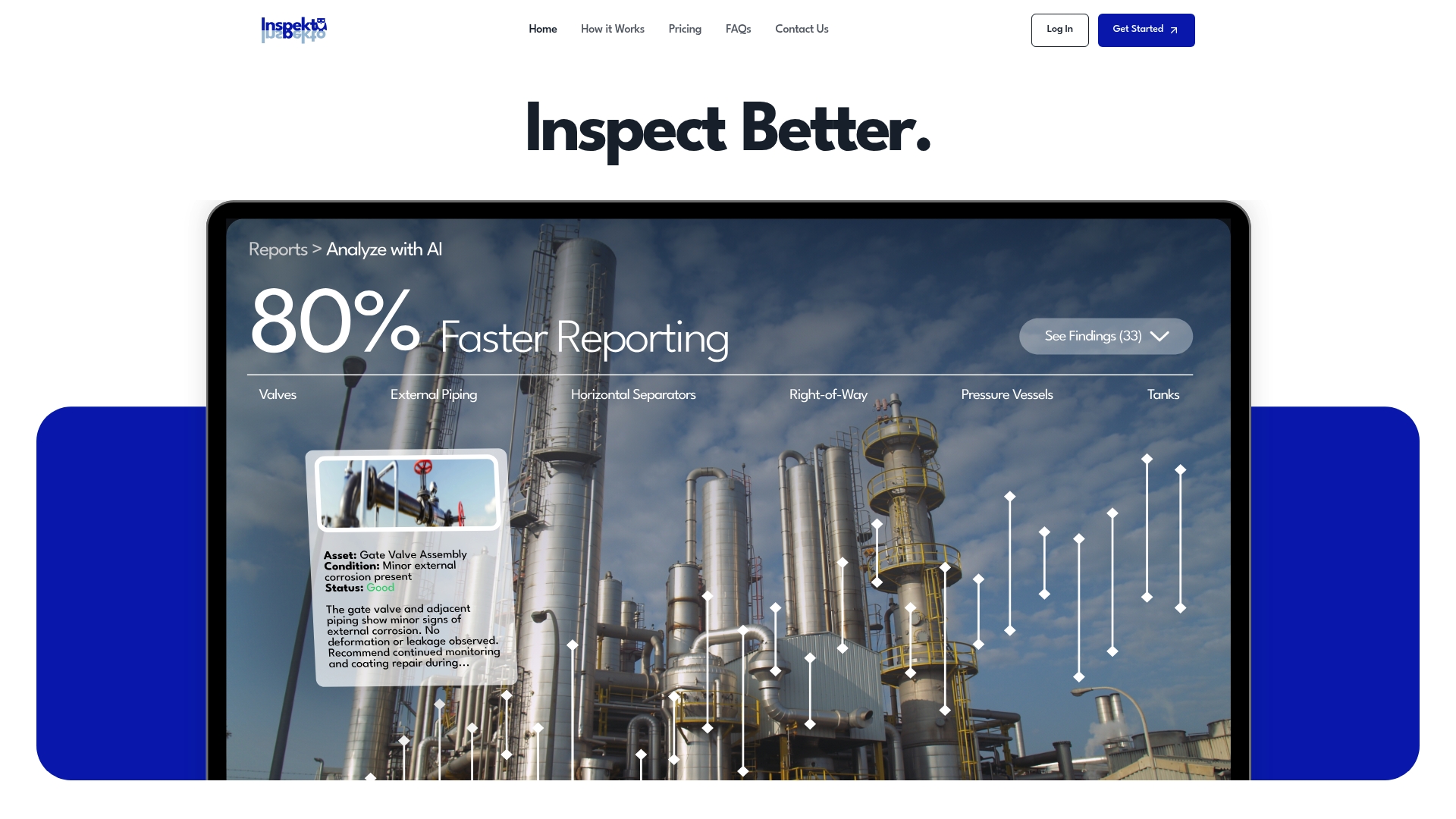
Teams that have relied on spreadsheets or generic PDF forms tend to notice the difference fastest during audit prep, when finding a specific clause citation from eighteen months ago takes seconds instead of an afternoon of searching. Enterprise teams get support for custom template configuration and system integrations as part of onboarding.
If you're ready to see how a standards-aligned template performs against your own inspection data, request a demo of Inspekto and run it against a real asset class before you scale it across your program.
Where to Read Further
- API Standard 570, 5th Edition, the current authority for piping inspection reporting requirements.
- API 510 & API 570: Manual vs. AI-Assisted Review, on where automation genuinely helps.
- API 570 Technical Toolboxes Knowledge Center, for template and appendix structure examples.
Frequently Asked Questions
What's the difference between inspection report templates and a standard checklist form? A checklist form is static; someone fills it out and someone else transcribes it. An in-platform template auto-populates from field data captured on mobile, then exports a structured, audit-ready report with a built-in trail.

Do inspection report templates need to be updated when API standards change? Yes. When API releases a new edition, such as the fifth edition of API 570, template clause references should be updated and the edition recorded in report metadata so auditors know which version governed a given inspection.
Can AI-generated reports replace a certified inspector's judgment? No. AI-assisted review strengthens the documentation side, classifying findings and reconciling repair history, but certified inspectors still perform the physical NDE work and the engineering judgment calls that determine severity and corrective action.
What export formats do auditors typically accept for inspection reports? PDF with embedded metadata and Excel or CSV for structured data both work well, provided attachments preserve their original metadata rather than getting stripped during export.
How much faster is a template-based digital workflow compared to manual reporting? Teams using automated capture and clause-aware templates report turnaround up to four times faster than manual, paper-based methods, though actual results vary by asset complexity and rollout scope.