
Compliance reporting automation uses connectors, continuous control testing, and a reporting engine to turn scattered evidence into audit-ready documentation with far less manual work. Instead of a spreadsheet marathon every quarter, the system pulls logs, photos, and system data on an ongoing basis, tests them against control requirements, and pushes the results into dashboards mapped to frameworks like SOC 2, ISO 27001, and HIPAA.
The immediate payoff shows up in three places:
- Report generation that takes hours instead of weeks
- Fewer transcription and data entry errors reaching auditors
- Evidence that's already organized and time stamped when the audit request lands
Inspection-heavy sectors see this most sharply. That speed gap is the difference between a compliance team that scrambles before every audit and one that's ready on any given Tuesday.
Key Takeaways
Compliance reporting automation replaces manual evidence chasing with continuous capture, testing, and reporting mapped directly to frameworks like SOC 2, ISO 27001, and HIPAA.
| Point | Details |
|---|---|
| Definition and mechanics | Automation combines connectors, an evidence engine, continuous control testing, and a reporting engine to produce audit-ready evidence. |
| Start with high-pain controls | Pilot the control generating the most manual complaints, not the easiest one to automate. |
| Mapping quality determines success | Poorly mapped evidence produces dashboards nobody trusts, even after automation launches. |
| Governance stays essential | Human review of exceptions, retention policy, and audit-trail logging keep automation defensible. |
| Field-first capture speeds inspections | Inspekto's mobile capture of photos and voice notes into API 570/510 templates enables reporting up to four times faster than manual methods. |
Table of Contents
- How Does Compliance Reporting Automation Work?
- What Are the Business Benefits of Automating Compliance Reports?
- What Components and Technologies Matter Most in a Compliance Automation Tool?
- How Do You Implement Compliance Reporting Automation Step by Step?
- What Can't Compliance Automation Replace?
- How Does Field-Capture Automation Speed Up Audit-Ready Reporting?
- What's a Realistic Timeline and Cost for Getting Started?
- What Are the Most Common Pitfalls in Compliance Automation?
- How Do You Keep Automated Compliance Data Secure and Private?
- What Should You Ask Before Choosing a Compliance Automation Vendor?
- How Do You Measure ROI After Automating Compliance Reporting?
- Why Pilot Selection Determines Whether Automation Succeeds
- Why Inspekto Fits Inspection-Heavy Compliance Reporting
- Frequently Asked Questions
- Sources
How Does Compliance Reporting Automation Work?
Automation isn't one tool. It's a stack of connected pieces, each doing a specific job so evidence flows from the field or the server log to a finished report without a human retyping anything in between.
1. Data ingestion layer. Connectors and APIs pull from cloud infrastructure logs, CMMS platforms, HRIS systems, ticketing tools, and mobile field-capture apps. The variety matters. A financial services team might pull from AWS CloudTrail and an identity provider; an oil and gas inspector pulls from a mobile app capturing photos and voice notes in the field.
2. The evidence engine. This is where raw inputs become defensible proof. Every piece of evidence gets metadata attached: timestamp, source system, GPS location where relevant, and often a cryptographic hash so nobody can quietly edit a file after the fact. Explainability matters here too. When an auditor asks "how was this evidence collected," the system needs a clear answer, not a black box.
3. Continuous control testing. Rather than checking controls once a quarter, the system tests them on a rolling basis, often daily, and fires an alert the moment something drifts out of tolerance. A misconfigured access control or an expired certificate gets flagged in near real time instead of surfacing six months later during an audit.
4. Reporting engine and templates. Evidence gets mapped into templates aligned to the frameworks you actually report against. A SOC 2 Type II report pulls different evidence sets than a GDPR data processing record, and the templates need to reflect that.
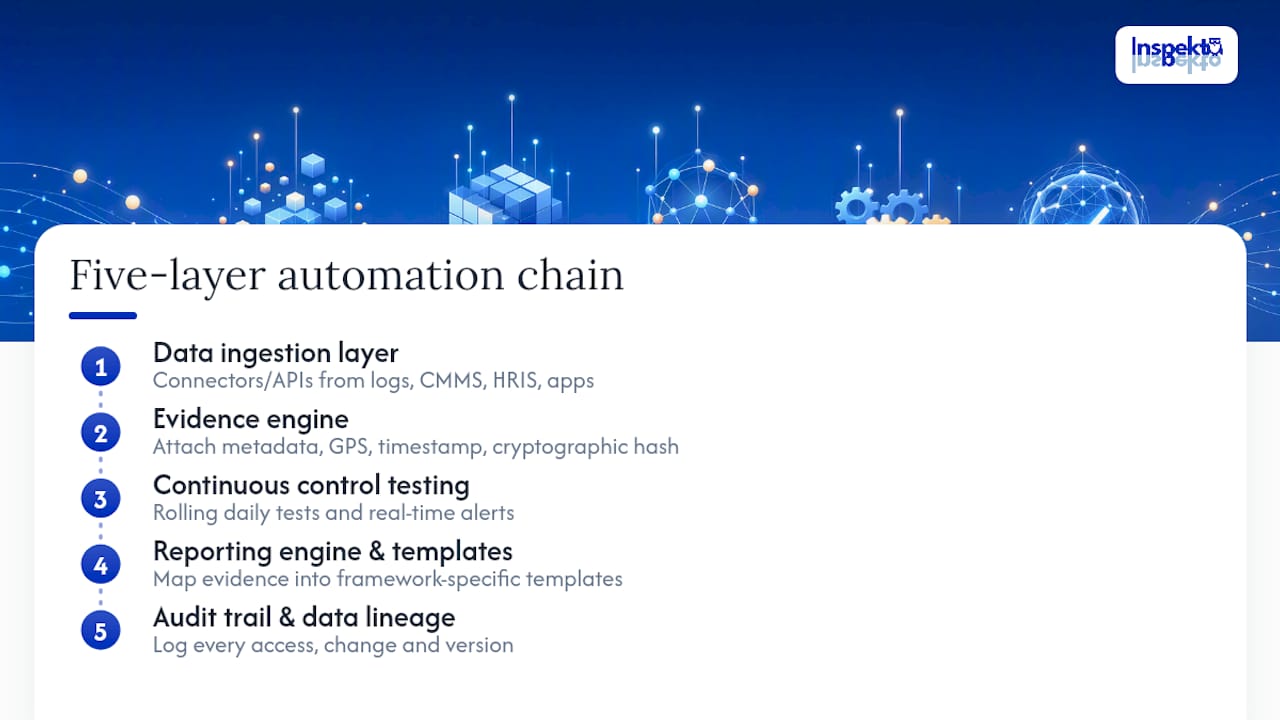
5. Audit trail and data lineage. Every change, every access, every version gets logged so you can trace a data point back to its source months later.
That five-layer chain is what separates real regulatory reporting automation from a glorified file cabinet with a nicer interface.
What Are the Business Benefits of Automating Compliance Reports?
The case for automating compliance reporting isn't abstract. It shows up in specific, trackable numbers that compliance leaders can carry into a budget conversation.
Manual evidence collection eats staff hours that never show up as a line item until someone tallies the time spent chasing screenshots and system exports. Automation reduces that manual work directly, and it closes control gaps that tend to hide in the space between quarterly reviews.
Here's where the gains concentrate:
- Time and cost. Hours spent gathering evidence drop sharply once systems feed data automatically instead of waiting for a person to export it.
- Accuracy. Fewer manual transcription steps means fewer mismatched dates, missing fields, and copy-paste errors that turn into audit findings.
- Audit velocity. Continuous evidence collection means audits start with a folder that's already organized, not a fire drill.
- Scale. One evidence engine can serve multiple frameworks and multiple business entities without multiplying headcount.
- Risk visibility. Real-time dashboards surface which controls are failing before an auditor does, giving remediation teams a real service-level window instead of a surprise.
The audit-readiness point deserves emphasis. Compliance teams that treat evidence collection as a continuous background process, rather than a pre-audit sprint, stop dreading the calendar. That shift in posture, from reactive to always-ready, is the actual business case, and it's why frameworks like SOC 2 and ISO 27001 increasingly expect continuous monitoring rather than point-in-time snapshots.
What Components and Technologies Matter Most in a Compliance Automation Tool?
Not every platform that claims "automated compliance" does the same job. When you're evaluating options, focus on the pieces that determine whether the system actually reduces work or just adds another dashboard to check.
Integration depth. Ask vendors exactly which systems they connect to natively versus which require custom API work. A tool that claims broad coverage but needs six months of engineering time per connector isn't saving anyone time in year one.
Field and mobile capture. For inspection-heavy industries, this is the component that matters most. Photos and voice notes captured directly in the field, tagged with metadata and GPS location, eliminate the lag between an inspection happening and a report existing.

Template mapping. Look for pre-built templates aligned to the frameworks you actually report against, not generic forms you have to reshape yourself.
Rules engine and exception handling. Continuous testing is only useful if exceptions route to the right person with enough context to act. A vague alert that says "control failed" without detail just creates a new manual investigation task.
Security and retention. Ask how long evidence is retained, who can access it, and whether the audit trail itself is tamper-evident.
Pro Tip: Before signing anything, ask a vendor to walk through one real control end-to-end, from raw data capture to finished report. If they can't show you that flow live, the automation claim is probably more marketing than architecture.
How Do You Implement Compliance Reporting Automation Step by Step?
A staged rollout beats a big-bang deployment every time. The sequence that consistently works maps requirements first, integrates systems second, and automates evidence capture only once the mapping is solid.
- Map your obligations. List every framework you report against and identify the handful of controls that generate the most manual work today. Start there, not with everything at once.
- Catalog your systems. Inventory every data source, cloud logs, HR systems, field apps, and check which ones actually have usable APIs versus which require workarounds.
- Design templates and mappings. Build the connection between raw evidence types and the specific framework requirements they satisfy, whether that's SOC 2, ISO 27001, or HIPAA.
- Automate capture. Turn on connectors and field tools, and confirm metadata (timestamps, source, location) attaches correctly from day one.
- Pilot and validate. Run the automated flow alongside your existing manual process for one audit cycle and have internal audit sample-test the results against source documents.
- Scale and maintain. Expand to additional frameworks or business units, track your KPIs, and put change control around any rule or mapping update so nobody edits a control test without a record of it.
Pro Tip: Pick your pilot control based on pain, not glamour. The control that generates the most complaints from your team during audit season is usually the one where automation proves its value fastest.
What Can't Compliance Automation Replace?
Automation reliably replaces repetitive evidence gathering: pulling logs, capturing timestamps, generating standard reports. It does not replace judgment calls about what a control gap actually means for your risk posture, and it doesn't write policy.
Blending automation with human review stays necessary because remediation decisions, especially complex ones involving legal exposure or customer impact, require context a rules engine doesn't have.
Common failure points to watch for:
- Treating automation as "set and forget" instead of reviewing rule logic periodically
- Skipping human sign-off on exceptions flagged by continuous testing
- Missing audit-trail requirements because a tool wasn't configured to log its own changes
- Assuming one framework's mapping transfers cleanly to another without review
Governance guardrails, approval workflows, logged human-in-the-loop review on exceptions, and clear retention policies, are what keep automation from becoming a liability instead of a safeguard.
How Does Field-Capture Automation Speed Up Audit-Ready Reporting?
Inspection-heavy industries face a specific version of the compliance reporting problem: the evidence lives in the field, not in a database. An inspector walking a pipeline or a storage tank generates photos, voice notes, and measurements that traditionally get transcribed into a report hours or days later, often with details lost in translation.
Inspekto's approach captures that data directly through a mobile app at the point of inspection. Photos and voice notes feed structured templates immediately, with AI handling the pre-fill work that used to require a person retyping field notes into a formal report format. Inspekto's platform supports templates aligned to API 570 and API 510, the standards oil and gas inspectors report against for piping and pressure vessel inspections.
Field-capture tools that replace manual photo logging and transcription tend to produce the largest measurable time savings in inspection-heavy industries, because the gap between data capture and finished report shrinks to nearly zero.
That gap is exactly what drives Inspekto's reported benchmark of reporting up to four times faster than manual methods. For a compliance manager overseeing dozens of field inspections a month, that speed difference determines whether audit prep is a scramble or a formality.
What's a Realistic Timeline and Cost for Getting Started?
Most compliance teams can pilot automation on a single framework or control set within four to eight weeks. That window covers requirement mapping, connecting two or three priority data sources, and building initial templates. A full-scale rollout across multiple frameworks and business units typically runs three to six months, depending on how many legacy systems need custom integration work.
Cost scales primarily with two variables: how many systems need connectors and how much manual mapping work your frameworks require. SaaS-based compliance automation tools generally price by usage volume, seat count, or data volume rather than a flat fee, which means a small compliance team piloting one framework pays substantially less than an enterprise running SOC 2, ISO 27001, and GDPR reporting simultaneously across five business units.
The effort estimate matters as much as the dollar figure. Expect your compliance and IT teams to spend real hours upfront on mapping controls to evidence sources correctly. That mapping work is the part vendors rarely mention in sales conversations, and it's also the part that determines whether your automation actually reduces work or just relocates it. Teams that rush this step end up with dashboards full of evidence nobody trusts, because nobody verified the mapping logic before turning it on.
Budget for a review cycle too. Frameworks change, systems get replaced, and a control mapping that was accurate at launch drifts out of date within a year if nobody owns its maintenance.
What Are the Most Common Pitfalls in Compliance Automation?
The most frequent failure isn't technical. It's mapping controls to the wrong evidence, or to evidence that looks right but doesn't actually satisfy what an auditor needs to see. Teams often automate the easy 80% of reporting and leave the hardest, most audit-sensitive 20% manual, which defeats the point.
A second common trap: treating automation as a one-time project instead of an ongoing program. Rules and mappings that were correct at launch drift as frameworks update or systems change, and nobody notices until an audit finding traces back to stale logic.
Alert fatigue causes real damage too. A continuous testing system that fires too many low-priority alerts trains staff to ignore notifications, which buries the one alert that actually matters.
Strategies that address these directly:
- Start with a small number of high-value controls instead of trying to automate everything at once
- Assign explicit ownership for reviewing and updating mappings on a fixed schedule
- Tune alert thresholds so exceptions represent genuine risk, not noise
- Run periodic sample audits internally to catch mapping drift before an external auditor does
How Do You Keep Automated Compliance Data Secure and Private?
Automated systems that touch compliance evidence often handle sensitive data: employee records, customer information, proprietary operational details. Security failures here don't just create a breach risk, they undermine the credibility of the compliance program itself.
Access control comes first. Evidence repositories need role-based permissions so only people who need to see specific records can, and every access event should log to the same audit trail that tracks the evidence itself.
Encryption matters at rest and in transit, without exception, particularly for field-captured data moving from a mobile device to a central system. Pairing AI-driven monitoring with governance controls for explainability and auditability keeps automated decisions traceable rather than opaque.

Retention policy deserves its own review. Frameworks like GDPR impose specific limits on how long personal data can be held, and an automation system that keeps evidence indefinitely by default can create its own compliance violation. Set retention rules deliberately, tied to the framework's actual requirement, not to whatever the vendor's default happens to be.
Finally, vet the vendor's own security posture. A tool automating your compliance evidence should carry its own SOC 2 report or equivalent attestation. If a vendor can't produce one, that's a signal worth weighing carefully before handing them your organization's audit trail.
What Should You Ask Before Choosing a Compliance Automation Vendor?
Vendor selection comes down to a handful of concrete questions, not a features checklist. Start with integration: which systems does the tool connect to natively, and what's the realistic timeline for connecting the systems you actually run?
Ask how the vendor handles explainability. Some tools advertise high automation rates for structured reporting, with claims running as high as 94% automation for certain ESG disclosures in vendor materials. Those numbers depend heavily on how clean and structured your underlying data already is, so ask specifically what automation rate is realistic for your data, not the vendor's best-case client.
Other questions worth asking directly:
- What does the audit trail actually capture, and can auditors access it directly?
- How are exceptions routed, and who reviews them before a report goes out?
- What's the retention policy, and can it be configured per framework?
- Does the vendor provide templates for the specific standards you report against, or will your team build mappings from scratch?
- What happens when a connector breaks, silent failure or immediate alert?
Vendors that answer these plainly, with specifics rather than marketing language, are the ones worth a deeper pilot conversation.
How Do You Measure ROI After Automating Compliance Reporting?
ROI on compliance automation shows up in metrics you should already be tracking, if you weren't automated: time to evidence, audit findings count, and remediation SLA performance.
Time to evidence is the cleanest number. Track how long it takes to produce a complete evidence package for a given control before automation, then measure the same task after rollout. A drop from days to hours is the most direct proof the investment worked.
Audit findings offer a second, slightly delayed signal. Fewer findings tied to missing or inconsistent evidence after your first automated audit cycle indicates the mapping and evidence engine are working as intended, not just faster but more accurate.
Remediation SLA performance matters because continuous monitoring is supposed to catch control drift earlier. If exceptions get flagged and resolved faster than they did under quarterly manual review, that's the risk-reduction case paying off in real time.
Track staff hours reallocated too. The point of automation isn't just speed, it's freeing compliance staff from evidence-chasing so they can spend time on the judgment calls automation can't make: policy design, remediation strategy, and stakeholder communication.
Why Pilot Selection Determines Whether Automation Succeeds
The single biggest predictor of a successful rollout isn't the tool you pick. It's which control you pick first. Choose one with clear, measurable pain, high manual effort, frequent findings, and you get a pilot that proves value fast and builds internal support for scaling further.
Getting compliance, operations, and IT aligned before the pilot starts matters more than any feature comparison. Track time saved, findings reduced, and time to evidence from day one. Those three numbers make or break the budget conversation for phase two.
Why Inspekto Fits Inspection-Heavy Compliance Reporting
If your compliance burden lives mostly in the field, inspection logs, tank walks, pipeline checks, the bottleneck usually isn't reporting software. It's the gap between what an inspector sees and what ends up in a finished, audit-ready document. Inspekto closes that gap by capturing photos and voice notes directly through a mobile app and feeding them into structured templates the moment an inspection happens.
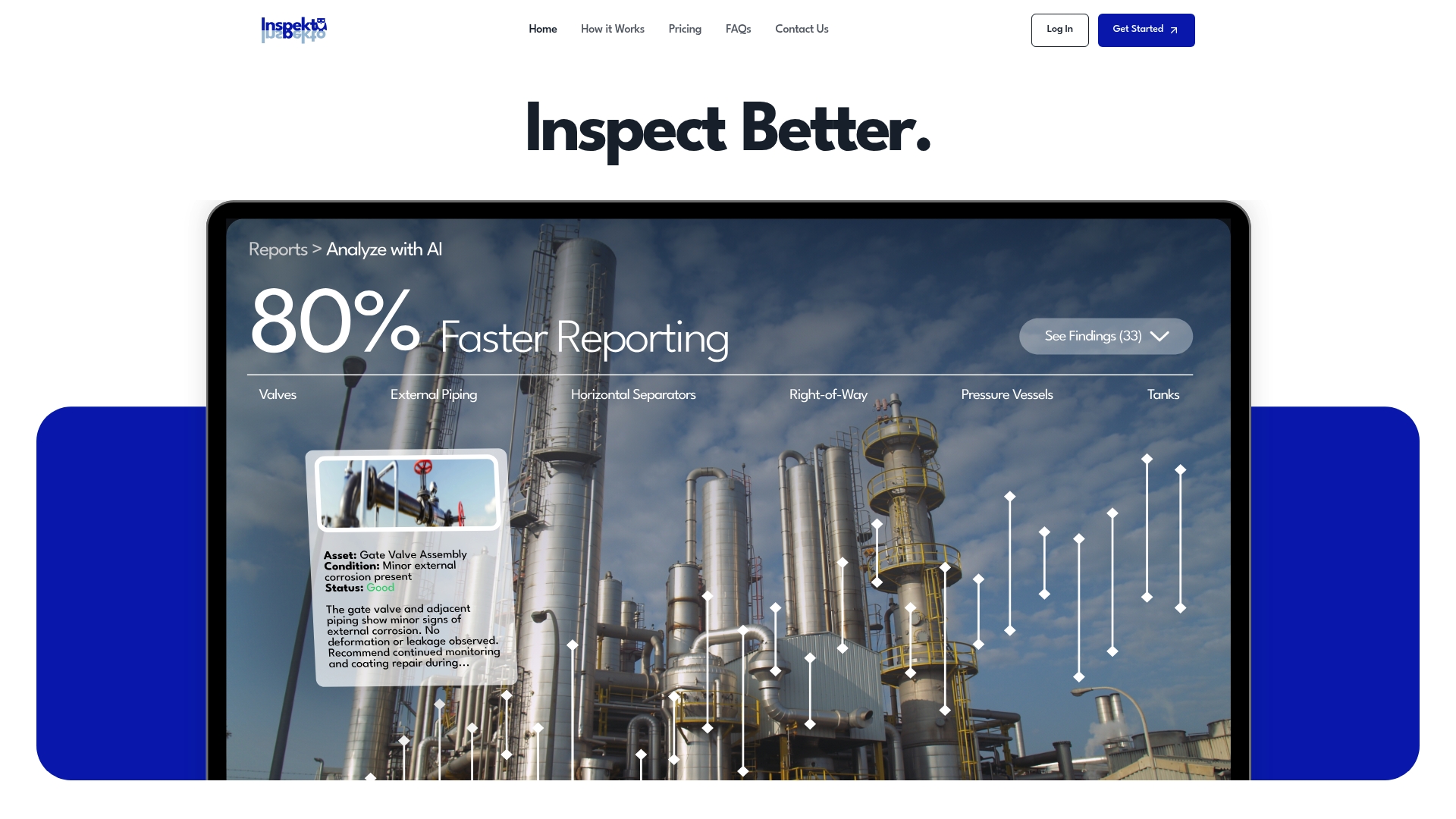
Reports built this way come out audit-ready, mapped to standards like API 570 and API 510, without a separate transcription step eating hours after the fact. Teams using this kind of field-first capture report generating inspection documentation up to four times faster than traditional manual methods. Bulk export in PDF or Excel and built-in team collaboration mean the finished report gets to reviewers and auditors without a second round of formatting.
If your team is still building reports from scattered field notes, Inspekto is worth a direct look. Start a trial or request a demo to see how field capture maps to your specific inspection templates before committing to a full rollout.
Frequently Asked Questions
What is compliance reporting automation?
It's the use of software to continuously collect evidence, test controls, and generate audit-ready reports mapped to frameworks such as SOC 2, ISO 27001, HIPAA, and GDPR, replacing manual, periodic evidence gathering.
How long does it take to automate compliance reporting?
A focused pilot on one framework or control set typically takes four to eight weeks. Full-scale rollout across multiple frameworks usually runs three to six months depending on system complexity.
Can compliance automation fully replace a compliance team?
No. It reliably replaces repetitive evidence collection and reporting tasks, but policy design, remediation judgment, and exception review still require human oversight.
What frameworks does compliance reporting automation typically support?
Common frameworks include SOC 2, ISO 27001, HIPAA, and GDPR, along with industry-specific standards like API 570 and API 510 for inspection-heavy sectors.
How do I measure whether compliance automation is working?
Track time to evidence, audit findings count, and remediation SLA performance before and after rollout to see whether the investment is producing measurable gains.
Sources
- Compliance Automation: Why It's a Business Imperative
- Compliance Automation Guide: Streamlining Compliance Tasks